XAMPP issue in Window Port 80 in use by “Unable to open process” with PID 4!
If you are a PHP developer, PHP developer and having a still an issue in exam. localhost PHPmyadmin.
XAMPP issue in Window Port 80 in use by “Unable to open process” with PID 4!
If you are a PHP developer, PHP developer and having a still an issue in exam. localhost PHPmyadmin.
The issue can be defined on live server but on localhost window user the error can be same. By following few steps you can solve out this problem.\
Before understanding of localhost troubleshooting with MySQL and Apache server.
 Problem detected!
12:41:58 PM  [Apache]  Port 80 in use by "Unable to open process" with PID 4!
12:41:58 PM  [Apache]  Apache WILL NOT start without the configured ports free!
12:41:58 PM  [Apache]  You need to uninstall/disable/reconfigure the blocking application
12:41:58 PM  [Apache]  or reconfigure Apache and the Control Panel to listen on a different port
12:41:58 PM  [mysql]  Problem detected!
12:41:58 PM  [mysql]  Port 3306 in use by "Unable to open process"!
12:41:58 PM  [mysql]  MySQL WILL NOT start without the configured ports free!
12:41:58 PM  [mysql]  You need to uninstall/disable/reconfigure the blocking application
12:41:58 PM  [mysql]  or reconfigure MySQL and the Control Panel to listen on a different port
or Error Can be
1:45:40 PM  [mysql]  Error: MySQL shutdown unexpectedly.
1:45:40 PM  [mysql]  This may be due to a blocked port, missing dependencies,
1:45:40 PM  [mysql]  improper privileges, a crash, or a shutdown by another method.
1:45:40 PM  [mysql]  Press the Logs button to view error logs and check
1:45:40 PM  [mysql]  the Windows Event Viewer for more clues
1:45:40 PM  [mysql]  If you need more help, copy and post this
1:45:40 PM  [mysql]  entire log window on the forums
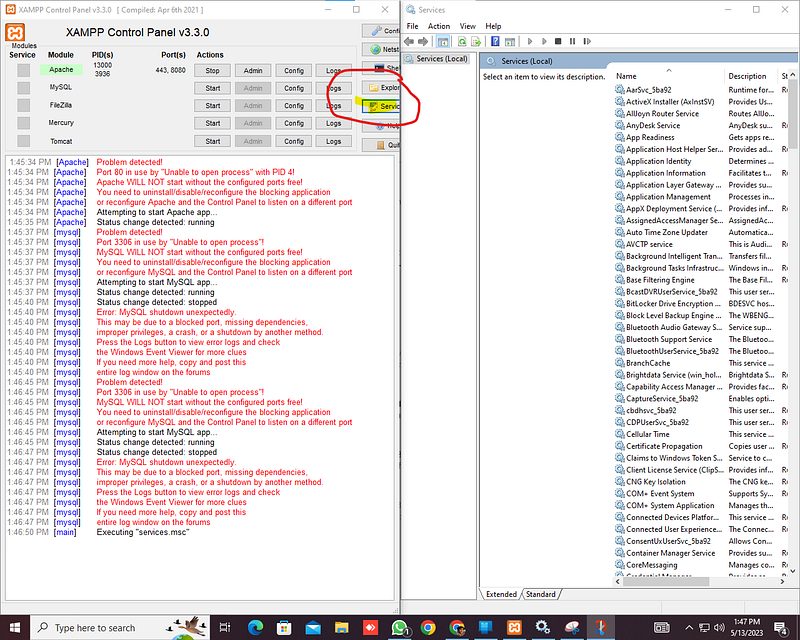
Open XAMPP go to Servius the you will find the system will be using SQL on 80 port
The Ultimate SQLmap Tutorial: Master SQL Injection and Vulnerability Assessment!
The Ultimate SQLmap Tutorial: Master SQL Injection and Vulnerability Assessment!
SQL Injection is a type of cyber attack where malicious actors exploit vulnerabilities in web applications to inject malicious SQL code…
The Ultimate SQLmap Tutorial: Master SQL Injection and Vulnerability Assessment!
SQL Injection is a type of cyber attack where malicious actors exploit vulnerabilities in web applications to inject malicious SQL code into backend databases. This can lead to the exposure of sensitive data, unauthorized access to systems, and even complete system compromise.
SQLmap is a powerful open-source tool used to automate the process of detecting and exploiting SQL Injection vulnerabilities in web applications. It is a command-line tool that can be used to enumerate databases, extract data, and even execute operating system commands on the underlying system.
Installing SQLmap
SQLmap is a cross-platform tool and can be installed on Windows, Linux, and macOS. Here are the steps to install SQLmap on each of these platforms:
On Windows:
Download the latest version of SQLmap from the official website.
Extract the downloaded file to a desired location.
Open the command prompt and navigate to the extracted SQLmap directory.
Run the “python sqlmap.py” command to start SQLmap.
On Linux:
Open a terminal window and type “sudo apt-get update” to update the system package list.
Type “sudo apt-get install sqlmap” to install SQLmap from the official repository.
Verify the installation by running the “sqlmap” command in the terminal.
Verify the installation by running the “sqlmap” command in the terminal.
To verify the successful installation, simply run the “sqlmap” command in the terminal or command prompt. If SQLmap is installed correctly, you should see the SQLmap logo and version information displayed in the terminal.
Basic Usage
Using the “sqlmap -u <target URL>” command to scan for vulnerabilities
Using the “sqlmap -u <target URL> — dbs” command to enumerate the list of databases
Using the “sqlmap -u <target URL> -D <database name> — tables” command to enumerate the list of tables in a database
Using the “sqlmap -u <target URL> -D <database name> -T <table name> — dump” command to extract data from a table
Advanced Usage
Modifying HTTP headers and cookies
To modify HTTP headers and cookies during a SQLmap scan, you can use the --headers and --cookie options respectively. Here's an overview of how to use them:
--headers: This option allows you to add or modify HTTP headers for the requests sent during the scan. You can use it to modify headers such as User-Agent, Referer, Cookie, etc.
For example, to modify the User-Agent header to "Mozilla/5.0" during a SQLmap scan, you would use the following command:
--cookie: This option allows you to set or modify cookies for the requests sent during the scan. You can use it to modify cookies such as PHPSESSID, JSESSIONID, etc.
For example, to modify the PHPSESSID cookie to "12345" during a SQLmap scan, you would use the following command:
sqlmap -u <target URL> --cookie="PHPSESSID=12345"
Note that you can also use the --cookie-file option to load cookies from a file. This can be useful if you want to reuse cookies from a previous session.
By modifying HTTP headers and cookies, you can bypass certain security measures that may be in place, such as web application firewalls or authentication systems.
Tampering with request parameters
To tamper with request parameters during a SQLmap scan, you can use the --data and --tamper options. Here's an overview of how to use them:
--data: This option allows you to set or modify the data sent in the request body during the scan. You can use it to modify parameters such as username, password, id, etc.
For example, to modify the id parameter to "1' OR 1=1#" during a SQLmap scan, you would use the following command:
sqlmap -u <target URL> --data="id=1' OR 1=1#"
--tamper: This option allows you to use custom tampering scripts to modify the data sent in the request body. Tampering scripts can be used to encode or encrypt data in a way that bypasses certain security measures, or to modify data in a way that triggers specific SQL Injection vulnerabilities.
For example, to use the apostrophemask.py tampering script to encode apostrophes in a request body, you would use the following command:
sqlmap -u <target URL> --data="id=1' OR 1=1#" --tamper=apostrophemask.py
You can also use multiple tampering scripts by separating them with a comma.
By tampering with request parameters, you can bypass certain security measures that may be in place, such as input validation or sanitization.
Bypassing filters and firewalls
Bypassing filters and firewalls during a SQLmap scan can be done using various techniques. Here are a few examples of how to use SQLmap to bypass different types of security measures:
Bypassing input filters: If a web application filters or blocks certain characters or keywords in input parameters, you can try to bypass the filter by encoding or obfuscating the input. For example, you can try URL encoding, HTML encoding, or using alternate character sets.
To URL encode the id parameter during a SQLmap scan, you would use the following command:
sqlmap -u <target URL> --data="id=%27+OR+1%3D1--"
Bypassing web application firewalls (WAFs): If a web application has a WAF in place that blocks SQL Injection attacks, you can try to bypass the WAF by using a technique called “tamper script evasion”. This involves modifying the SQL Injection payload in a way that bypasses the WAF’s signature detection.
To use the tamper/space2hash.py script to evade a WAF during a SQLmap scan, you would use the following command:
sqlmap -u <target URL> --data="id=1' OR 1=1#" --tamper=tamper/space2hash.py
Bypassing database firewalls: If a database has a firewall in place that blocks certain SQL commands or queries, you can try to bypass the firewall by using a technique called “time-based blind SQL Injection”. This involves sending SQL Injection payloads that cause the database to delay or sleep for a certain amount of time, which can be used to infer information about the database.
To use time-based blind SQL Injection during a SQLmap scan, you would use the following command:
sqlmap -u <target URL> --data="id=1' AND SLEEP(5)--"
Utilizing SQLmap API
The SQLmap API can be used to integrate SQLmap into custom scripts or programs, or to automate SQL Injection testing. Here’s an overview of how to utilize the SQLmap API:
Start the SQLmap server: Before you can use the SQLmap API, you need to start the SQLmap server. To start the server, use the following command:
sqlmapapi.py -s
This will start the SQLmap server on the default port (8775).
Send requests to the API: Once the SQLmap server is running, you can send requests to it using the API. Requests can be sent using HTTP GET or POST methods, and can include various parameters such as the target URL, injection technique, and tamper scripts.
For example, to scan a target URL using the Boolean-based blind injection technique and the apostrophemask.py tamper script, you would send an HTTP POST request to http://localhost:8775/task/new with the following JSON payload:
Get task status and results: After sending a request to the SQLmap API, you can check the status of the task and retrieve the results. Task status can be checked using an HTTP GET request to http://localhost:8775/task/<task ID>/status, while task results can be retrieved using an HTTP GET request to http://localhost:8775/task/<task ID>/data.
For example, to check the status and retrieve the results of a task with ID 1, you would send the following HTTP GET requests:
Utilizing the SQLmap API can be useful for automating SQL Injection testing and integrating SQLmap into custom scripts or programs.
Common Attacks and Countermeasures
Error-based SQL Injection
Error-based SQL Injection is a type of SQL Injection that relies on triggering errors in the target application to extract information from the database. Here’s an overview of how to perform Error-based SQL Injection using SQLmap:
Identify the target: As with any SQL Injection testing, the first step is to identify a target application that may be vulnerable to Error-based SQL Injection.
Determine the injection point: Once you’ve identified a target application, you need to determine where in the application’s input fields or parameters you can inject SQL code. You can use SQLmap’s built-in scanning features to help identify injection points.
Specify the injection technique: After identifying the injection point, you need to specify the Error-based SQL Injection technique using the --technique option. The Error-based SQL Injection technique is designated by the letter E.
Run the injection: Once you’ve specified the injection technique, you can run the injection using the --dump option to extract data from the database.
Here’s an example command to perform Error-based SQL Injection using SQLmap:
sqlmap -u "http://example.com/vulnerable.php?id=1"--technique E --dump
This command specifies the target URL and injection point using the -u option, the Error-based SQL Injection technique using the --technique option, and the --dump option to extract data from the database.
Blind SQL Injection
Blind SQL Injection is a type of SQL Injection that does not display errors or information that can help identify the vulnerability, making it more difficult to detect. Here’s an overview of how to perform Blind SQL Injection using SQLmap:
Identify the target: As with any SQL Injection testing, the first step is to identify a target application that may be vulnerable to Blind SQL Injection.
Determine the injection point: Once you’ve identified a target application, you need to determine where in the application’s input fields or parameters you can inject SQL code. You can use SQLmap’s built-in scanning features to help identify injection points.
Specify the injection technique: After identifying the injection point, you need to specify the Blind SQL Injection technique using the --technique option. The Blind SQL Injection technique is designated by the letter B.
Use the --data option: Blind SQL Injection usually involves sending custom data in the HTTP request to the server. You can use the --data option to specify the data that SQLmap should send.
Use the --string and --not-string options: Blind SQL Injection relies on identifying whether or not certain conditions are true or false, based on the server's response. You can use the --string and --not-string options to specify strings that SQLmap should look for in the server's response to determine whether a condition is true or false.
Here’s an example command to perform Blind SQL Injection using SQLmap:
sqlmap -u "http://example.com/vulnerable.php" --data="username=admin&password=password" --technique B --string="Welcome, admin!" --not-string="Invalid login"
This command specifies the target URL and injection point using the -u option, the custom data to send using the --data option, the Blind SQL Injection technique using the --technique option, and the --string and --not-string options to specify the strings to look for in the server's response.
Defense mechanisms and countermeasures
There are several defense mechanisms and countermeasures that can be used to prevent or mitigate SQL Injection attacks like the ones performed using SQLmap. Here are some common ones:
Parameterized queries: One of the most effective ways to prevent SQL Injection is to use parameterized queries. This involves using placeholders for user input in SQL statements and binding them to typed parameters at runtime, which helps prevent malicious SQL code from being executed.
Input validation and sanitization: Input validation involves checking user input against predefined rules, such as input length, character types, and format, while input sanitization involves filtering out potentially harmful characters or commands from user input. This can help prevent malicious input from being executed as SQL code.
Principle of least privilege: The principle of least privilege involves limiting user privileges and access to only what is necessary for their job functions. This can help prevent SQL Injection attacks by limiting the damage that can be done with stolen or compromised credentials.
Network segmentation and firewalls: Network segmentation involves dividing a network into smaller segments or subnets, each with its own security controls, while firewalls can be used to filter and block traffic based on predefined rules. These measures can help prevent attackers from gaining access to sensitive data or systems.
Web application firewalls (WAFs): WAFs are designed to monitor and filter incoming traffic to web applications, detecting and blocking malicious traffic such as SQL Injection attacks. They work by analyzing traffic patterns and using predefined rules to filter out malicious traffic.
Implementing these defense mechanisms and countermeasures can help prevent or mitigate SQL Injection attacks like the ones that can be performed using SQLmap. It’s important to remember that security is an ongoing process and requires continuous monitoring and updating to stay effective against evolving threats.
Conclusion
SQLmap is a powerful tool for detecting and exploiting SQL Injection vulnerabilities in web applications. It has a wide range of features and capabilities, including scanning for vulnerabilities, retrieving data from tables, and utilizing advanced techniques such as error-based and blind SQL Injection.
SQLmap can also be used in combination with other tools to enhance its capabilities and effectiveness, such as Burp Suite, Metasploit Framework, Nmap, OpenVAS, and Metagoofil.
Because of bug bounty programs, many 0-day vulnerabilities are going somewhere else instead of being reported to company portals.
The Core Problem
This is one of the hardest realities to understand: many researchers who report 0-day vulnerabilities are not getting paid enough. As a result, serious vulnerabilities and exploits are moving outside official markets.
Today, buyers range from government agencies to sophisticated threat actors who are willing to purchase these vulnerabilities privately. This is becoming one of the greatest cybersecurity threats of the 21st century.
Photo by SCARECROW artworks on Unsplash
What Our Observations Suggest
According to our observations, many vulnerabilities are being sold on underground forums, dark web markets, and even discussed on platforms like Reddit. These are often later purchased by well-funded groups, including state-level actors.
One major reason vulnerabilities are moving off-platform is simple: researchers are not being paid enough by organizations.
For example, remote code execution issues in widely used technologies have historically remained undisclosed for long periods. In some reported cases, such exploits were allegedly acquired by government entities for offensive operations.
The Economic Reality
When a researcher reports a zero-day vulnerability through official programs, payouts often range between $3,000 and $20,000 (in many typical cases).
However, in underground markets, high-impact exploits can reach hundreds of thousands to millions of dollars, depending on:
Target popularity
Exploit reliability
Remote exploitability
Persistence capability
Detection difficulty
This price gap creates a dangerous incentive imbalance.
Expanding Attack Surface
Vulnerabilities today appear across many layers, including:
Frameworks
Packages
Third-party dependencies
Build pipelines
Package registries
Recently, supply-chain incidents (such as compromised package ecosystems) have shown how a single package takeover can impact massive numbers of downstream applications.
In some situations, platforms quietly fix issues after disclosure, reducing public visibility and long-term learning for the security community.
Why This Matters for Every Organization
This is no longer just a big-tech problem.
The risk now affects:
Multimillion-dollar enterprises
SaaS platforms
Healthcare systems
Startups
Even small local businesses
Any organization running outdated or poorly monitored infrastructure is exposed.
A Concerning Data Point
In a recent large-scale scan across approximately 20 million IP addresses, we observed a worrying pattern: a measurable portion of exposed systems showed signs of being highly exploitable.
This highlights a simple truth — the attack surface across the internet remains massive.
Final Thoughts
If organizations want responsible disclosure to win over underground markets, they must:
Offer competitive bounty rewards
Respond quickly to researchers
Build trust with the security community
Improve vulnerability triage speed
Invest in proactive security programs
Fair compensation and strong collaboration are critical. Otherwise, more high-impact vulnerabilities will continue to drift into private markets — where defenders lose visibility.
I cancelled LinkedIn Premium because the platform’s increased focus on non-professional topics, misinformation, and political or religious posts has weakened its value for business networking. Instead, I’m investing my time in sources that provide quality business news and real job opportunities.
Why LinkedIn No Longer Feels Professional
Over time, LinkedIn has shifted from a career-focused platform to something closer to general social media. My feed increasingly featured:
Political debates
Religious discussions
Ideological arguments
Viral-style engagement posts
Questionable or misleading content
This shift diluted its original purpose — professional networking, hiring, and industry discussion.
I believe a platform built for careers should prioritize:
Hiring opportunities
Industry insights
Skill development
Business collaboration
When attention-driven content dominates, professionals lose the value they came for.
Platforms I Use Now for Job Searching & Networking
For professional networking and job searching, I’ve moved toward platforms that maintain a clearer business focus:
Indeed – Strong for active hiring and direct applications
HackerRank – Useful for technical skill validation
Stack Overflow – Great for developer visibility and community reputation
Medium – Ideal for storytelling and professional writing
Rather than relying solely on social feeds, I now focus on:
Direct applications
Skill-based platforms
Building visible expertise
Connecting with relevant professionals directly
Is This a Recent Trend?
This shift hasn’t happened overnight. Over several years, many professionals — especially in development and design — have gradually reduced their activity on LinkedIn.
As the platform became more engagement-driven, specialists started preferring targeted platforms that align directly with their career goals.
Developers, for example, now prefer assessment platforms and technical communities over algorithm-driven content feeds.
Examples of Non-Professional Content
Some of the issues I encountered included:
Religious advocacy posts unrelated to work
Political campaigning
Extremist narratives
Scam profiles
Engagement bait content
Professional platforms should focus on careers, business, and industry growth. Personal storytelling and opinions are better suited for publishing-focused platforms like Medium.
Why Medium Works Better for Me
Medium has been valuable for:
Sharing structured insights
Publishing long-form thoughts
Increasing targeted traffic
Reaching readers interested in substance
Unlike feed-based networking sites, Medium is built for narratives and knowledge sharing.
Final Thoughts
LinkedIn still has value, but its direction needs stronger moderation and a renewed focus on professionalism. Without that, it risks becoming another entertainment-driven platform — and professionals will continue to migrate elsewhere.
For now, I prefer tools that prioritize hiring, expertise, and real business discussions over attention metrics.
Organizations often fail to properly identify and understand incoming cyber threats during penetration testing, only recognizing security breaches when it is already too late.
In past decades, most organizations have opened bug bounty programs to allow penetration testers and security researchers to take an interest in their business. These penetration testers and security researchers individually collaborate with the businesses and their teams to secure their business, whether it’s a critical bug or a small mistake that is left in our code.
But most of the understanding goes wrong when organizations are not trying to understand what the deadliest consequences are. Organizations that do not allow the bug bounty program are inviting hackers to manipulate their data, which leads to large-scale data breaches. These data get sold to several organizations on the dark web and to government agencies. These people take an interest in purchasing the information that is available on the dark web.
On October 13, 2023, a data breach happened that exposed 100,000
website domains, passwords, and emails without encryption or hashing. In this data breach, the majority of the records were from the healthcare sector, where people’s personal medical information was revealed.
Our team tried to figure out that some of the information was totally public on the web; anyone could go there and check what was going on.
These massive levels of data breaches often happen when organizations try to install a vulnerable plugin or null plugin that is available in marketplaces, and without quality assurance, they let them into their servers.
In most cases, these data breaches happen because organizations do not update their frameworks, plugins, and third-party services. Normal-level firewalls that are installed in web application architectures are only able to protect you from basic security issues.
In some cases, the data gets leaked through outdated systems and software that are installed from unknown websites; these might include keyloggers, ransomware, and much more.
Second attempt to take over entire bank system to get a job
Hello there hope you all are having a wonderful day. I hope you all remember me few months ago I upload a article about how I was able to bypass bank website login. After success for the time to avoidable to bypass more things now I am going to get in that website as masti but I can.
My name is Imran niyaz and I am going to share with you my personal experience how I am able to do this all ST.
Recently had decided to visit the website and let’s see what is going on there and I have seen after watching that article the company start hiring for another position for p********** tester. However if there able to find is all things and they find everything so they might be a chance the really don’t know what is going to be happened again.
I discuss about banking system in one tutorial banking system working. So I decided to use Atul name WPS can our popular wonderful to scanner called wordpress automation and testing.
I go and search for that and I used my API key I don’t have a paid version I do believe if I have a pair version that the turbo pm major things.
But I believe this is enough for them.
Since new government band all the VPN connection in our country so sometime it’s got hard for me to understand this all things that it is very important to use proxys for yourself.
This is embarrassing for me when I buy for a job this is cannot higher you we are looking for a better person who has better experience and must have a good qualification and education hard work for me. Table time and they
In my last article we have mention that why our team have left Window operatingsystem long time ago and we also mention there are lot of problems in Windows that can make Small & Large Problems.
because Bicodev background is from software engineering and Pen testing the QA engineering so we have Meny problem since first day when we move to window and then last day when I left Windows.
we are not saying windows is bad or linux is good. But we want to tell you that there are many problems there. Where open source gives a lot of free tools is almost half of the tools available on Windows. Which can couse a big problem for me. Especially when you are from countries where your company doesn’t give you the tools you should buy.
So, What Were the Reasons That Led Me to Switch to Linux for Life?
The answer was very simple. I have been using windows all my life which did not benefit me much. But when I decided to take it, I thought about many things which were as follows.
A faster Effective system:
One of the best reasons that Linux is so much better than Windows is that when I first installed Linux, I found that many of the tools I used to have to do in Windows were missing them. There was no need to. They were already inside Linux.
No unwanted updates:
Linux has one of the best techniques to maintain yourself do not use extra load from their systems meanwhile if you are using something it will not contain all your RAM like the Windows and specifically the Google products that are already installed on Window they are trying to lick your RAM.
Yes there is one thing that you can use multiple things on Windows but rather than you cannot use on any Linux distribution. But you need to understand about this thing that it's not about what you want to do else on window installing Microsoft.
Flexibility and memory save
Why it comes to flexibility linux is one of the best solution for enterprise levels Developers engineers quality insurance people and all the people who are trying to manage their daily base work debugging it become more easier.